• Skip to content
  • Skip to navigation
alert icon

Some online services will be unavailable on Sunday morning.

nsw logo NSW Government
Revenue NSW
  • About us
  • Help centre
  • News
  • Login
  • Contact us
  • Taxes, duties, levies and royalties
    • Land tax
    • Payroll tax
    • Property tax
    • Income tax equivalent regime
    • Transfer duty
    • Motor vehicle duty
    • Gaming and wagering
    • Insurance duty
    • Emergency services levy
    • Foreign buyers and land owners
    • Health insurance levy
    • Parking space levy
    • Passenger service levy
    • Royalties
  • Fines and fees
    • Fines
    • Fees
    • Advocates and sponsors
    • Support and community services
  • Grants and schemes
    • First Home Buyers Assistance Scheme
    • First Home Owner (New Homes) Grant
    • Approved shared equity schemes
    • Electric Vehicle Rebate
    • Electric Vehicle Stamp Duty Refund
    • Previous schemes
  • Unclaimed money
    • More about unclaimed money
    • Search and make a claim
    • Return unclaimed money
  • About us
  • Help centre
  • News
  • Login
  • Contact us
    Taxes, duties, levies and royalties
  • Land tax
  • Payroll tax
  • Property tax
  • Income tax equivalent regime
  • Transfer duty
  • Motor vehicle duty
  • Gaming and wagering
  • Insurance duty
  • Emergency services levy
  • Foreign buyers and land owners
  • Health insurance levy
  • Parking space levy
  • Passenger service levy
  • Royalties
Check the key dates and be payroll tax ready

Visit the key dates for payroll tax webpage and schedule these dates in your calendar to avoid missing lodgement dates and additional costs associated with late lodgement.

    Fines and fees
  • Fines
  • Fees
  • Advocates and sponsors
  • Support and community services
Fines and fees have moved to nsw.gov.au

Pay now or learn about your options to manage your fines and fees including setting up a payment plan.

    Grants and schemes
  • First Home Buyers Assistance Scheme
  • First Home Owner (New Homes) Grant
  • Approved shared equity schemes
  • Electric Vehicle Rebate
  • Electric Vehicle Stamp Duty Refund
  • Previous schemes
Approved shared equity schemes

Learn more about becoming a shared equity partner approved by the Chief Commissioner of State Revenue, to support home buyers in purchasing property in NSW.

    Unclaimed money
  • More about unclaimed money
  • Search and make a claim
  • Return unclaimed money
Search unclaimed money and make a claim

Learn how to easily search for unclaimed money, start a claim, check the status of your claim or return unclaimed funds.
Help centre
  • Home
  • Help centre
  • Resources
  • Data and statistics
  • Open Data self-service portal
Listen

Open Data self-service portal instructions

The open data self-service portal has been developed to enhance the publicly accessible data provided by Revenue NSW. Users can now select the data they need, in the format they require. Privacy has been a consideration and the portal has the ability to redact information, only if it needs to, based on the selections made.

On this page

Registering your details for the first time

Before you can use the Revenue NSW Open Data portal, you will first need to register using a valid email address and set your password.

  1. Click ‘Register’ from the home screen of the portal. You will be prompted to enter your email address and set a password.
  2. Please make sure to follow the password requirements before selecting ‘Sign up’.
  3. You will receive a verification code to the email address that you entered. Enter the verification code from your email into the space provided on the log in page.

    It’s important that you do not close the ‘Log in’ window on your browser, as you will need to enter the verification code directly into the space provided. If you close the window before entering the code, you won’t be able to register.
  4. Once the verification code has been entered, click ‘Confirm account’, and you will be redirected to the Open Data Portal.

Once the registration process has been completed, you can access the portal using the email address and password you used to register.

Register


Navigating the Open Data self-service portal

The Open Data portal has five steps to complete to get the data you are requesting.

Step 1 – Choose a category

There is a choice of categories based on the type of data you would like. You can only select one option to proceed.

Step 2 – Choose a dataset

Select the specific dataset based on the category that you selected in step one.

Step 3 – Choose fields

You will find a list of fields to choose from and you can choose as many as you need. See the detailed field descriptions for fines and field descriptions for land tax.

Some date selections may have further drop-down options enabling you to select between:

  • ‘Financial year’
  • 'Financial Year YYYY-YYYY'
  • ‘Calendar year’
  • ‘Year-Month’

Step 4 – Choose a report format

Choose the format you want the data to be exported to:

  • ‘CSV’
  • ‘TSV’ or
  • ‘Excel’.

You can only select one format. If you need the data in multiple formats, a separate entry will need to be completed.

Step 5 – Review and Submit

Please review your selections on the summary shown. This ensures you are happy with your selections before submitting the form.


Obtaining the data

Once the form has been submitted, the data will be sent to your email address.

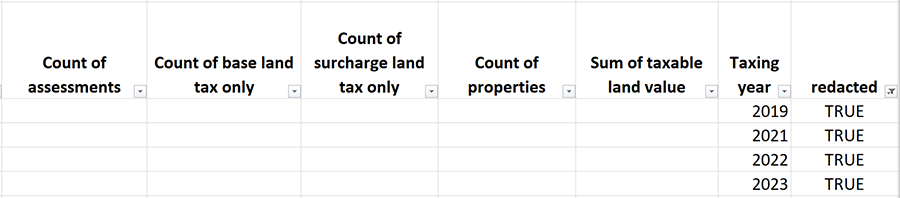
Please note: The portal has a feature that redacts information if privacy implications are present. The sensitive data will appear blank, and the column titled ‘redacted’ will display as ‘TRUE’.

A table showing the data obtained.

If this occurs, you may need to reduce the number of ‘fields’ you are reporting on to avoid triggering this feature.

Emailed links to data remain accessible for 30 days after the selections are made.

  • Previous
    Penalty notice dashboard for speeding offences by vehicle class
  • Back to top
  • Next
    First home owner grant scheme by financial year DSG 001

Quick links

  • Open Data portal instructions

  • Open Data self-service portal

  • Fines field descriptions

  • Land tax field descriptions

    • Facebook
    • Twitter
    • LinkedIn
    • Email
  • Download or print PDF
  • Taxes, duties, levies and royalties
  • Fines and fees
  • Grants and schemes
  • Unclaimed money
  • Terms
  • Privacy
  • Accessibility
  • Sitemap
  • nsw.gov.au
  • YouTube
  • LinkedIn